Private Password Locker App1.1
Publisher Description
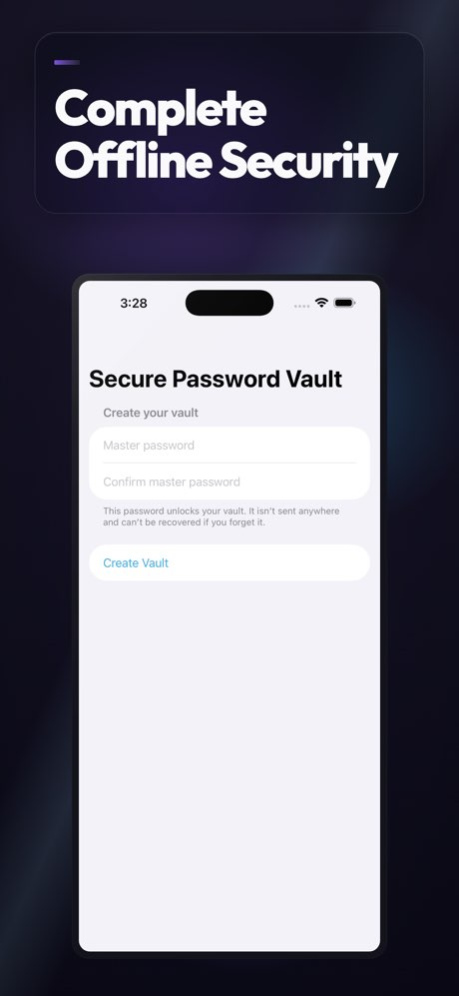

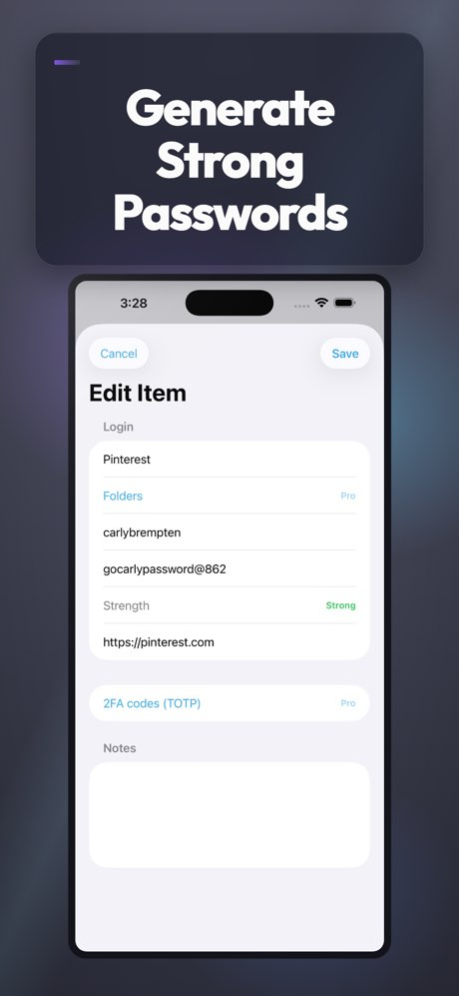

Secure Password Vault Pro is a powerful offline password manager designed to securely store and organize your login credentials and sensitive information on your iPhone. It uses strong AES-GCM encryption with keys derived from your master password using PBKDF2 (HMAC-SHA256) to keep your vault safe and private. Your master password is never uploaded or stored outside your device, ensuring full control and privacy.
Key Features:
- Store login items with title, username, password, URL, and notes.
- Search across all fields including title, username, URL, and notes for quick access.
- Fast add, edit, and delete flows using intuitive forms.
- Detail view supports copying username, password, or URL to clipboard with automatic clipboard clearing after a configurable timeout (10-120 seconds) for added security.
- Built-in password generator with customizable length (8-64 characters) and character sets including lowercase, uppercase, digits, and symbols.
- Password strength meter to help you create strong, secure passwords.
- Backup and restore your vault using encrypted export/import files. Backup files remain encrypted and require your master password to restore.
Pro Features (available via lifetime unlock):
- Biometric unlock using Face ID or Touch ID stores your master password securely in the device Keychain protected by biometrics, allowing quick and secure access.
- Two-factor authentication (2FA) support with TOTP codes generated on-device from Base32 secrets stored per entry, enabling easy code copying.
- Organize entries with folders for lightweight, flexible categorization.
- Mark entries as favorites and filter your vault to quickly access important items.
- Change your master password anytime; the vault is re-encrypted on-device, and biometric unlock remains functional.
Security and Privacy:
- The vault is encrypted locally with no network calls or cloud sync, ensuring your data never leaves your device.
- Master password verification uses a Keychain-stored verifier to distinguish between wrong password and empty vault states.
- Auto-lock option locks the vault when the app becomes inactive or backgrounded.
- Clipboard auto-clear feature removes sensitive copied data after a configurable timeout, only if unchanged.
User Experience:
- Easy setup with master password creation on first launch.
- Clear and intuitive interface built with modern forms for quick data entry and editing.
- Detailed about section explains encryption methods, storage, and privacy.
- Settings allow you to configure biometric unlock, auto-lock on background, and clipboard clear timeout.
Backup & Restore:
- Create encrypted backup files within the app.
- Share backups securely using the iOS share sheet.
- Restore vaults by importing previously exported encrypted backup files.
- Restoring requires your current master password to decrypt and access the vault.
Notes:
- Master password is essential; it cannot be recovered if lost.
- Biometric unlock is optional and device-dependent; fallback to manual entry is always available.
- Not a call recorder or cloud sync service.
Secure Password Vault Pro offers a robust, privacy-focused password management solution for iPhone users who want full control over their sensitive data with strong encryption, biometric convenience, and offline security. Manage your passwords, 2FA codes, and notes confidently with this comprehensive vault app.
How it works
Open Secure Password Vault Pro, explore the main controls, and use the on-screen options to get things done. The interface is designed to stay out of your way so you can focus on the task.
Highlights
. Free (core vault)
. Search across title/username/url/notes
. Fast add/edit/delete flows with SwiftUI forms
. Detail view supports copy to clipboard for username/password/url
. Password generator + strength meter
. Backup & restore (encrypted file export/import)
. Pro (IAP: Lifetime unlock)
. Fol
Version History Bug fixes and enhancements 1.1 Apr 19 1.0 10/05/2016
About Private Password Locker App
The company that develops Private Password Locker App is Sandeep Bhandari. The latest version released by its developer is 1.1.
To install Private Password Locker App on your iOS device, just click the green Continue To App button above to start the installation process. The app is listed on our website since 2026-10-06 and was downloaded 27 times. We have already checked if the download link is safe, however for your own protection we recommend that you scan the downloaded app with your antivirus. Your antivirus may detect the Private Password Locker App as malware if the download link is broken.
How to install Private Password Locker App on your iOS device:
- Click on the Continue To App button on our website. This will redirect you to the App Store.
- Once the Private Password Locker App is shown in the iTunes listing of your iOS device, you can start its download and installation. Tap on the GET button to the right of the app to start downloading it.
- If you are not logged-in the iOS appstore app, you'll be prompted for your your Apple ID and/or password.
- After Private Password Locker App is downloaded, you'll see an INSTALL button to the right. Tap on it to start the actual installation of the iOS app.
- Once installation is finished you can tap on the OPEN button to start it. Its icon will also be added to your device home screen.
Program Details
System requirements
Download information
Pricing
Version History
version 1.1
posted on 2026-10-06
Version History Bug fixes and enhancements 1.1 Apr 19 1.0 10/05/2016
version 1.1
posted on 2026-09-05
Version History Bug fixes and enhancements 1.1 Apr 19 This app has been updated by Apple to prepare for watchOS 27 compatibility. No new features are included. 1.0 10/05/2016
version 1.1
posted on 2026-08-27
Version History Bug fixes and enhancements 1.1 Apr 19 This update from Apple will improve the functionality of this app. No new features are included. 1.0 10/05/2016
version -
posted on 2026-03-22
version 1.0
posted on 2016-10-05
Oct 5, 2016 Version 1.0
This app has been updated by Apple to use the latest Apple signing certificate.
version 1.0
posted on 2016-10-05
Oct 5, 2016 Version 1.0
This app has been updated by Apple to display the Apple Watch app icon.
version 1.0
posted on 1970-01-01
5 de oct. de 2016 Version 1.0
This app has been updated by Apple to use the latest Apple signing certificate.
version 1.0
posted on 1970-01-01
5 Eki 2016 Version 1.0
This app has been updated by Apple to use the latest Apple signing certificate.
